Easy Thumbnailer generates crisp, correctly-sized thumbnails from JPG, PNG, GIF, BMP, TIFF, WebP and a dozen other image formats. Process a single photo or batch thousands at once - custom dimensions, full quality control, no guesswork.
Easy Thumbnailer is built for photographers, web developers, content managers and anyone who needs to resize and thumbnail images quickly - whether you have one photo or a thousand.
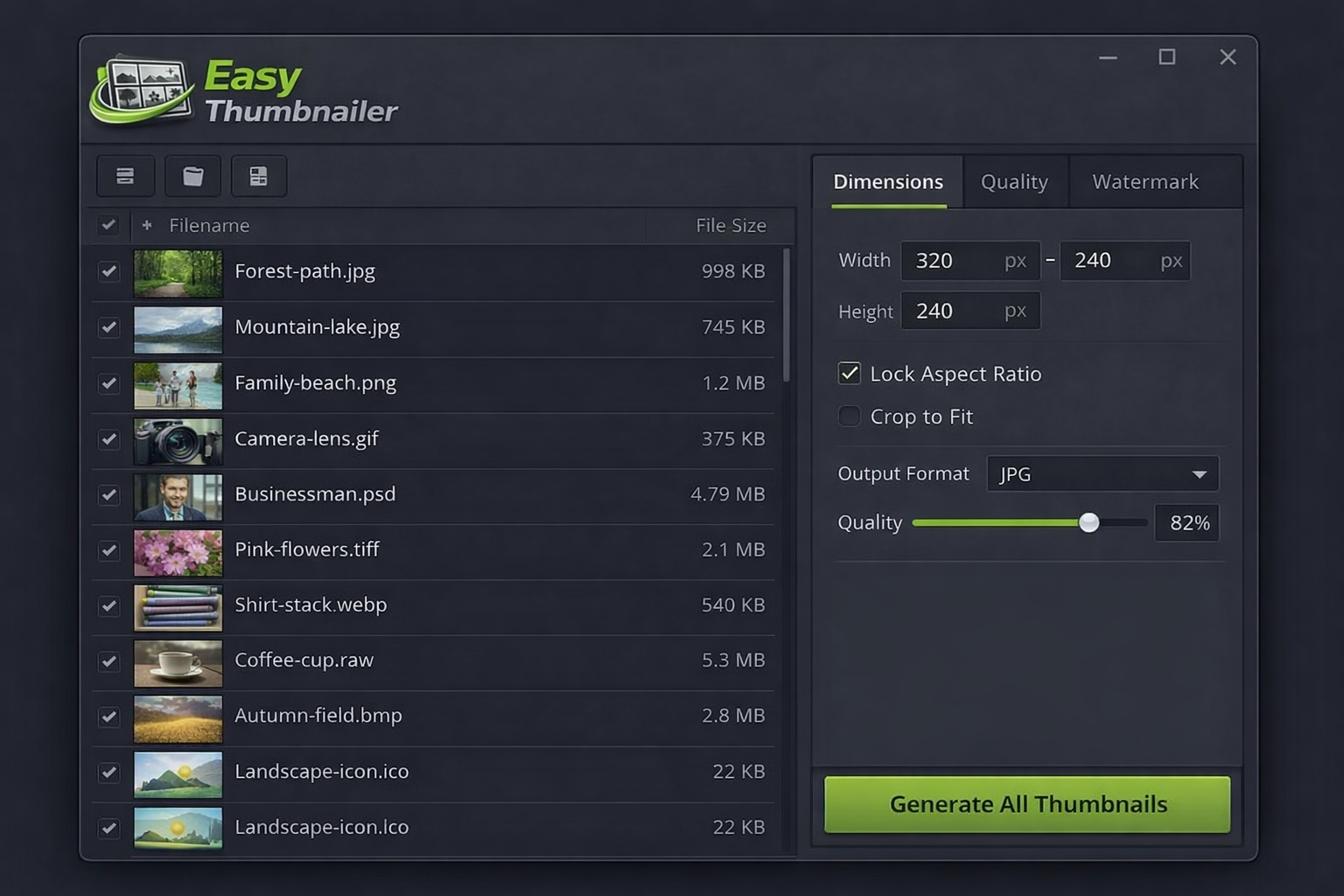
Drop an entire folder of photos and thumbnail them all in one go. Easy Thumbnailer processes your entire image library automatically, applying the same settings to every file in the batch - saving hours of manual resizing.
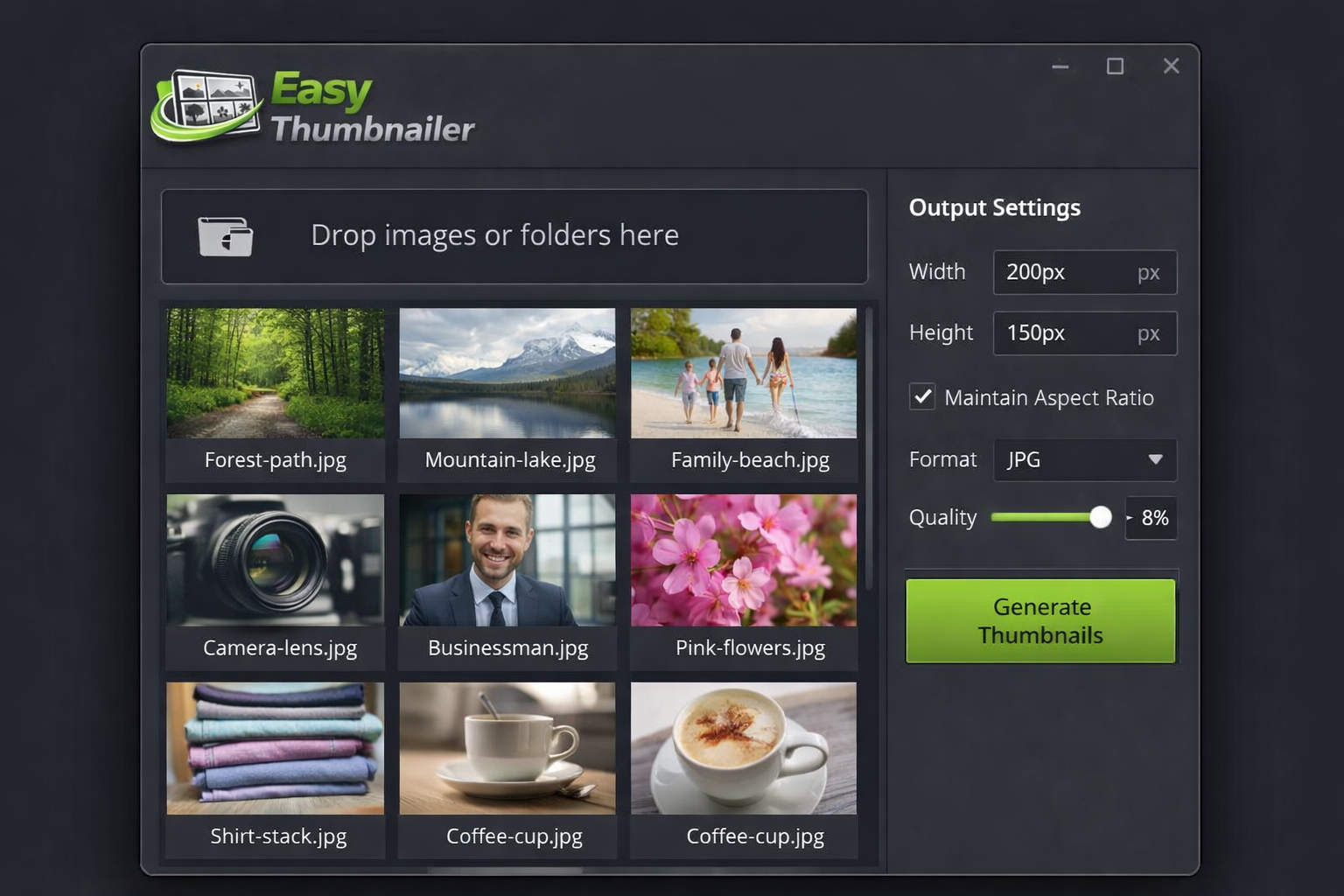
Set exact output widths and heights in pixels, or define a maximum bounding box. Easy Thumbnailer generates thumbnails at precisely the dimensions you specify - great for e-commerce listings, blog posts, galleries, and social media.
Automatically maintain the original proportions of every image so thumbnails never look squashed or stretched. Or crop to an exact ratio like 1:1, 16:9 or 4:3 for consistent grid layouts across your entire image set.
Create thumbnails from JPG, PNG, GIF, BMP, TIFF, WebP, PSD, RAW, TGA, ICO, AVIF and more. Output to any supported format - convert PNGs to JPG thumbnails, TIFFs to WebP, or any combination in a single batch operation.
Fine-tune JPEG compression levels, PNG bit depth and output file size targets. Balance thumbnail quality versus file size precisely - essential for web performance, email attachments, CMS uploads and storage limits.
Automatically stamp a text or image watermark on every generated thumbnail. Position it in any corner or centred, adjust opacity, and apply it consistently across your entire batch - protecting your photography with zero extra effort.
Point Easy Thumbnailer at a watch folder and it will automatically generate thumbnails for any new image that appears - ideal for automated workflows, product photography pipelines and content management systems.
Control exactly how your output thumbnails are named using flexible naming templates. Append suffixes like _thumb or _200x150, preserve original filenames, or use sequential numbering - keeping your files organised without manual renaming.
See exactly how your thumbnail will look at the chosen dimensions and quality settings before committing to the full batch. Adjust and preview until you are happy, then run the batch with complete confidence.
Easy Thumbnailer is designed for everyone from photographers to developers - no technical expertise required. If you can open a folder, you can thumbnail a thousand images.
Download and run the lightweight Easy Thumbnailer installer on your Windows PC. Setup is complete in under 60 seconds with no bloatware.
Drag and drop photos into the app or browse to a folder. Add individual JPGs, PNGs, TIFFs or an entire directory for batch processing.
Enter your target width and height in pixels, choose your output format, set quality level and optionally add a watermark or naming template.
Click Generate Thumbnails and Easy Thumbnailer does the rest - producing perfectly-sized output images in seconds, ready to use immediately.
Whether you have ten product photos or twenty thousand stock images to resize, Easy Thumbnailer handles the entire job in one click. No online tools, no subscriptions, no upload limits - everything runs locally on your PC at full speed.
"I photograph products for an e-commerce client who needs thumbnails in three different sizes for every listing. Easy Thumbnailer does all three batches in about four minutes flat. What used to take me most of a morning is now done before my coffee goes cold."
"Managing a CMS with thousands of uploaded images, I needed a reliable way to regenerate thumbnails at new sizes when our design changed. Easy Thumbnailer batch-processed over 8,000 images overnight perfectly. The folder watch feature alone is worth five times the price."
"I run a stock photography archive with over 40,000 images across multiple formats - RAW, TIFF, PSD and JPG. Easy Thumbnailer is the only tool I have found that handles all of them in one batch without crashing. The watermarking on export is a brilliant bonus too."
Pay once and own Easy Thumbnailer forever. Every feature included, all supported formats, and free software updates at no extra cost - ever.
One-time payment - instant download after purchase
Enter your details below and click the button to pay securely via PayPal. Your download link appears instantly after payment.
Easy Thumbnailer supports 12 widely-used image formats as both input and output: JPG, PNG, GIF, BMP, TIFF, WebP, PSD, RAW, TGA, ICO, AVIF and HEIC. You can create thumbnails from any supported input format and save them to any supported output format - including cross-format conversion such as TIFF to WebP or PSD to JPG - all within the same batch operation.
Yes. Batch processing is a core feature. You can load an entire folder - or a full folder tree with sub-folders - and thumbnail every image in a single operation. Easy Thumbnailer applies your settings to each file automatically, preserving the subfolder structure in the output directory if you choose.
Simply enter your desired width and height values in the Dimensions panel. You can set a precise output size like 200 x 150 pixels, or use a maximum bounding box so that Easy Thumbnailer fits each image within your specified dimensions while maintaining the original aspect ratio. You can also lock the aspect ratio to ensure images are never distorted.
No. Easy Thumbnailer uses high-quality resampling algorithms to produce clean, sharp thumbnails at any target size. You also have full control over JPEG compression quality so you can balance visual sharpness against file size to suit your exact requirements.
Yes. The Watermark tab in the settings panel lets you add a text watermark (your name, copyright notice or website URL) or an image watermark (your logo). You can position it in any corner or centre, and set the opacity so it sits subtly or prominently on the thumbnail. The watermark is applied automatically across every image in your batch.
Yes. Easy Thumbnailer can open RAW image files from most camera manufacturers as well as Adobe Photoshop PSD files and use them as the source for thumbnail generation - outputting them to JPG, PNG, WebP or any other supported format, making it ideal for photographers and designers managing large creative archives.
Folder Watch is an automated mode where you point Easy Thumbnailer at a source folder on your PC. Whenever a new image file is saved to that folder - by a camera import, FTP upload, or any other process - Easy Thumbnailer automatically generates a thumbnail from it using your saved settings. This is ideal for automated photography pipelines, CMS workflows, and product image management systems.
Easy Thumbnailer runs on Windows 7, Windows 8, Windows 10 and Windows 11 in both 32-bit and 64-bit editions. If you have a specific compatibility question please get in touch via redbagproductions.com before purchasing.
It is a one-time payment of $29.95. You own the software outright - no monthly or annual renewal fees, ever. Future software updates during the product lifecycle are also provided free of charge as part of your purchase.
Immediately after your PayPal payment is confirmed, you are automatically redirected back to this page where your Easy Thumbnailer download link will appear. The download is instant - you can be installing the software and generating your first batch of thumbnails within minutes of completing your purchase.
Join thousands of photographers, designers and web developers already using Easy Thumbnailer to create perfectly-sized thumbnails from any image format in seconds - without a monthly subscription.
Get Easy Thumbnailer - Only $29.95Secure PayPal | Instant download | No subscription | Free updates